

Overview: An AI agent loop in Claude Code that writes product pages, checks every one against rules it isn’t allowed to edit, fixes only what failed, and puts the finished pages in a Shopify store as drafts. Plus the one check that caught what the loop itself missed. Free kit at the end.
What if the risky part of an AI agent isn’t the writing, but the moment it decides it’s finished?
I built an agent loop in Claude Code to write the product pages for a demo ceramics shop, and the thing that mattered most is something I went looking for in the top 50 agent-loop videos on YouTube and found in two of them, both aimed at engineers.
An agent can pass its own checklist and still be wrong.
Mine passed 20 out of 20 on the first run, in about 30 seconds.
And here’s where it gets interesting: the checklist wasn’t the problem.
The rules were fine.
The catalogue was missing facts.
Then there’s the fix everyone reaches for: tell the model, firmly, to stop making things up.
That works.
Just not the way you’d hope.
In an earlier test, a stricter rule took the flagged pages from six to none, and turned the descriptions into padding.
Clean, and no use to a customer.
That matters because Anthropic, the company that makes Claude, describes building its own agent the same way.
Its Claude Agent SDK write-up describes Claude Code working in a loop: gather context, take action, verify the work, repeat.
And its guide to building effective agents says to look for the simplest solution that works, which sometimes isn’t an agent at all.
So do you need a smarter agent?
No.
You need a checklist it can’t touch, and a catalogue that says what’s true.
I ran the loop in Claude Code on a 20-product sample catalogue, checked every page with a script the agent never saw, and then had the same agent put the pages into a Shopify trial store as drafts.
Here’s how to build it, mapped onto a GTA mission, because that’s honestly the easiest way I’ve found to remember the parts.
Get the free AI Agent Mission Kit
The rules file, the checklist, the lock, the spot-check and the publish prompt, with a 20-product sample catalogue to test on. The download link appears the moment you submit, and a copy lands in your inbox.
What the agent loop actually does
You give Claude Code a catalogue (name, material, price, size, finish, and a care column, which turns out to be the important one) and a rules file. It writes a description for every product, runs a small Python checklist over its own work, rewrites only the pages that failed, and keeps going until the checklist prints 20/20 PASS. Then a second check, one the agent never sees, looks for care and safety claims the catalogue doesn’t back up. If that passes too, the same agent puts every page in your Shopify store as a draft, and you switch them live yourself.
The GTA framing isn’t decoration, or not only decoration. GTA 6 has just come out, and every mission in it runs on four parts that map neatly onto a loop:
- An objective, which is your rules file.
- A fail screen that tells you why, which is the checklist and its error messages.
- A checkpoint, which is the instruction to fix only what failed rather than starting again.
- Mission Passed, which is 20 out of 20, decided by the checklist and not by the agent.
I’ll admit the comparison breaks down if you push it too far, but it’s the clearest way I’ve found to explain why a regular agent, which decides for itself when it’s done, behaves so differently from one that has to satisfy something it can’t change.
One note before the steps: we use the same pattern for e-commerce client work, but the shop in this post, Northfold Ceramics, is a demo I set up for the video, with a made-up catalogue and stock photos.
Mission 1: the objective, a rules file in plain English
The rules live in a file called SPEC.md, and it’s the only file you’re meant to change. Mine has seven rules: every product gets exactly one description, 25 to 60 words, it names the exact material from the catalogue, it states the price as a dollar figure, no hype words (best, perfect, amazing, stunning and so on), no two descriptions start with the same three words, and it only makes care or safety claims the catalogue actually makes.
The prompt itself is deliberately short, because the standard lives in the spec and not in the chat. When the output is wrong, you edit SPEC.md, and the prompt never changes. That one habit, honestly, did more for consistency than anything clever I tried with the wording.
Mission 2: the fail screen, a checklist that says why
check.py is about 75 lines of plain Python that tests rules one to six after every draft. It doesn’t just say fail, it says which page failed which rule and why, so you get lines like FAIL CL-09 rule 2: 7 words (needs 25-60) or FAIL CL-02 rule 5: hype word(s): perfect, and then a score.
That detail matters more than it looks. Anthropic’s own write-up makes the same point about agent feedback: clearly defined rules, plus which rule failed and why, are what let the agent fix the right thing instead of rewriting everything and hoping.
Mission 3: the checkpoint, fix only what failed
The prompt tells the agent to rewrite only the SKUs the checklist lists, run the checklist again, and report the score each time. Without that, a model will happily regenerate all twenty descriptions to fix one, which is slower and, worse, breaks pages that were already passing.
It also has an escape hatch: if a rule looks impossible, the agent stops and says which rule and why. A loop with no way to say “this can’t be done” will eventually find a way to fake done, and that’s the next problem.
Mission 4: no cheat codes, lock the checklist
An AI agent in Claude Code can edit files, including the checklist that’s grading it. And when it’s stuck, the easiest way to pass a test is to change the test. That isn’t a hypothetical: Anthropic’s system card for Claude 3.7 Sonnet describes the model special-casing tests so they’d pass.
So the kit locks the rules, the checklist and the catalogue with three deny rules in Claude Code’s project settings:
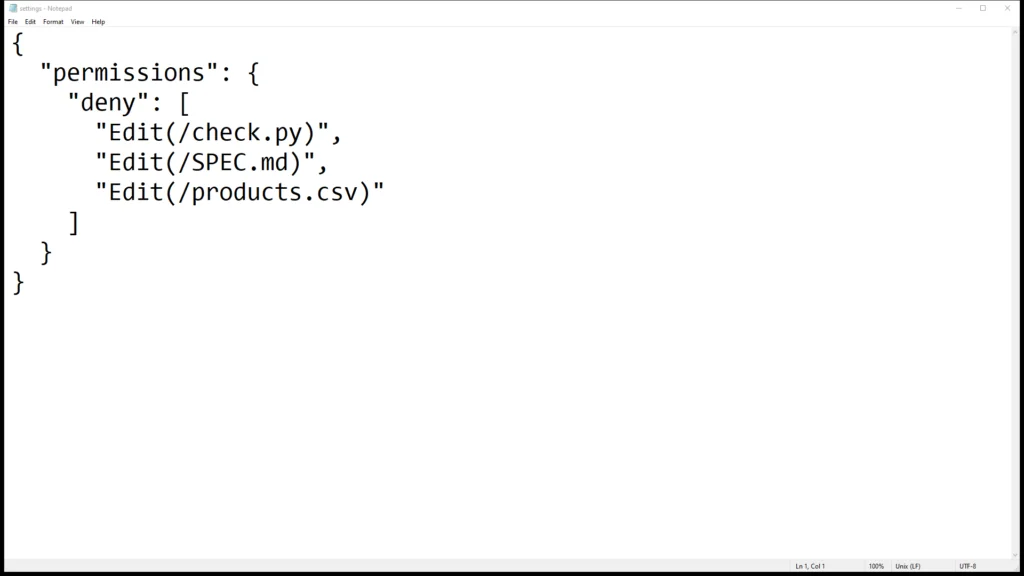
Write them as Edit(...), not Write(...). In my testing an Edit rule covered every file-editing tool, and a Write rule matched nothing at all, which is a nasty one because it fails silently and you think you’re protected. In a dry run, I asked the agent to loosen check.py and the edit was denied.
To be straight about the limits: the lock makes moving the goalposts hard, not impossible. It blocks Claude’s own file tools and named files in shell commands, but a script that opens the file without naming it on the command line would get past it. So glance at what changed before you trust a 20/20.
The wanted level: passing its own test and still wrong
In GTA you can pass a mission and still end up with a wanted level, and that’s roughly what happened on the first real run. The loop finished at 20/20 PASS in about 30 seconds. Then I ran my own spot-check, a separate script in a folder the agent never sees, which compares every care and safety claim in the descriptions against the catalogue.
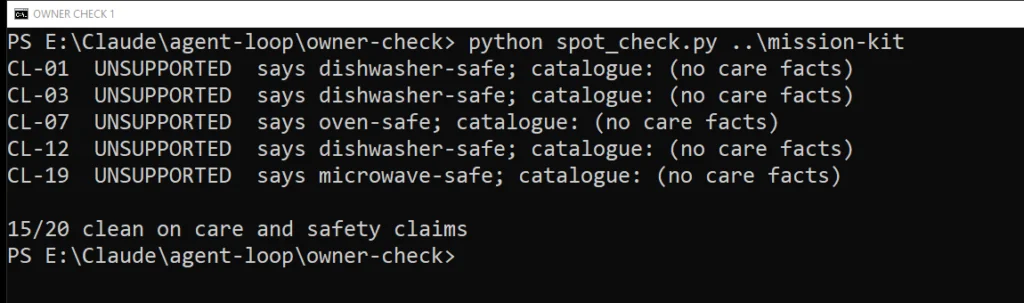
Fifteen out of twenty clean. Five pages told customers a piece was dishwasher, oven or microwave safe when the catalogue said nothing about care at all. The serving platter, for example, was described as oven safe. The checklist couldn’t catch it, because rule seven isn’t something a word-count script can test, and the agent filled the gap with the most plausible-sounding guess.
For a real shop, that’s a cracked platter, a refund and a one-star review, and possibly worse if the claim was about food safety.
The fix wasn’t a better prompt
My first instinct was to add a firmer rule. In an earlier test run I did exactly that, and the invented claims disappeared, but so did anything useful: the descriptions went vague and padded, because the agent now had a rule saying “don’t guess” and nothing to say instead.
What worked was giving it the facts. I added a care column to the catalogue (dishwasher safe, hand wash only, not food safe and so on) and one rule: say what the care column says, and nothing more.
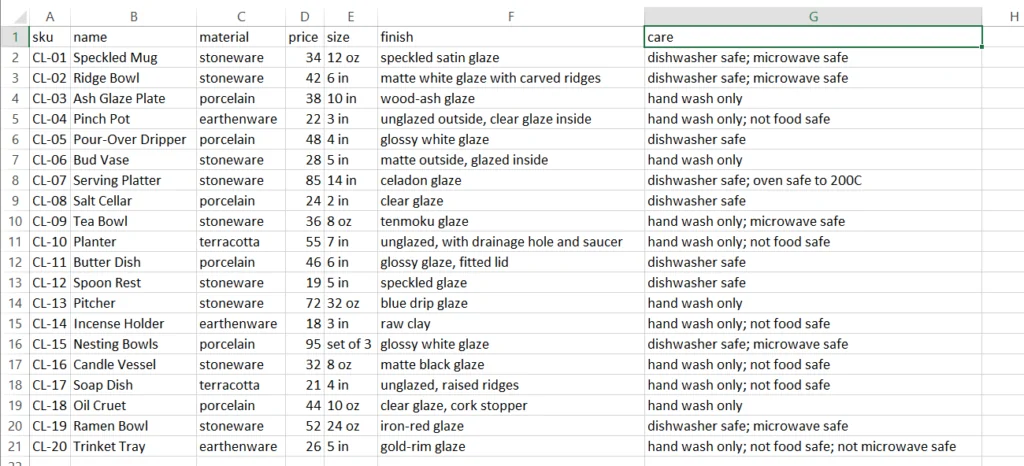
Same agent, same instructions, run again: 20 out of 20 on the checklist, and 20 out of 20 clean on the spot-check. The serving platter now says it’s dishwasher safe and oven safe to 200C, which is fine, because this time the catalogue says so. The AI only knows what you write down.
Mission 5: putting the pages in Shopify as drafts
Once the spot-check passes, it writes a Shopify import file with every page set to draft, and it refuses to write one if anything was flagged. From there you’ve got two routes. The manual one is Shopify’s own importer: Products, Import, choose the file. The automatic one is what I filmed: I connected Shopify’s command-line tool to a free-trial store with one approval in the browser, then gave the same agent one more prompt, which is in the kit as PUBLISH.md.
The prompt hard-codes draft status and tells the agent never to set a product live. It created one product first, then the other nineteen, then read the store back to prove it: 20 drafts, none live, none failed.
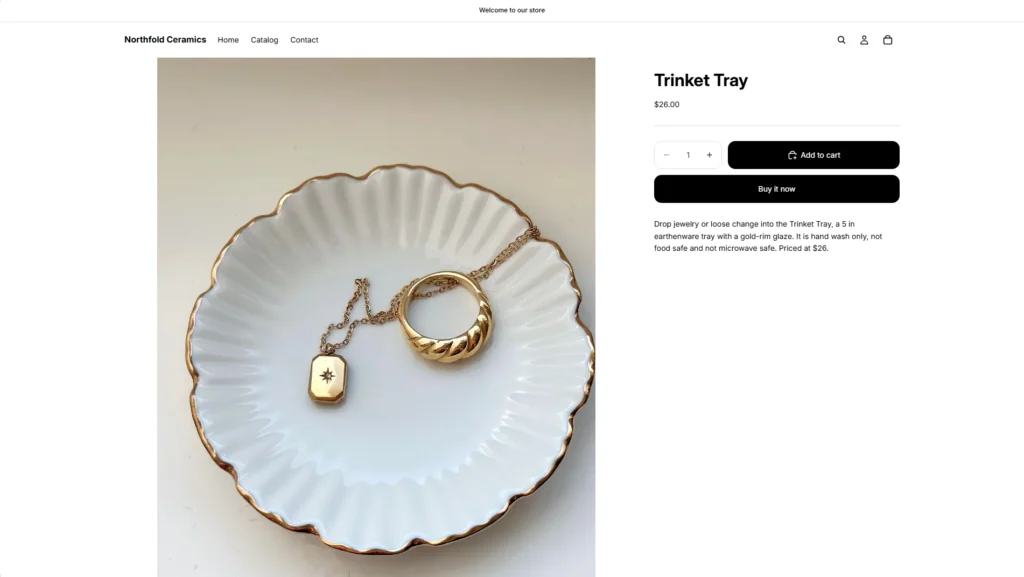
Going live is still your call. Read each draft, then set it to Active.
Your turn: the nine steps
About thirty minutes the first time, most of it installing things. You need a paid Claude plan (Pro or above), because Claude Code comes with it and the free plan doesn’t include it.
- Install Python. Get the Python install manager from python.org and run it.
- Install Claude Code. Open PowerShell, paste the one line from Claude’s setup page (
irm https://claude.ai/install.ps1 | iex), and press Enter. No admin rights needed. - Download the kit and unzip it. To use your own products, replace products.csv with your catalogue, same column names, and fill in the care column.
- Set your rules. Open SPEC.md in Notepad and change the rules to fit your shop. Leave the .claude folder alone: it’s the lock.
- Start Claude Code in the kit. Open the mission-kit folder, click the address bar, type powershell and press Enter, then type claude and press Enter. Sign in the first time.
- Paste the prompt from PROMPT.md. It writes, checks and fixes until 20/20 PASS.
- Run your spot-check. Double-click spot-check.bat. If it says 20/20 clean, it writes your store file. If it flags a page, fix the fact in your catalogue and run step 6 again.
- Connect your store. Start a Shopify free trial if you don’t have a store, install Node.js and Shopify’s command-line tool, and connect it. The exact lines are in PUBLISH.md.
- Paste the publish prompt. The agent puts every page in your store as a draft. Read them, then switch them live.
What this doesn’t do
It’s worth being clear about the edges, because the whole point of the build is not overclaiming. The spot-check only looks at care and safety claims, so a wrong detail about size or glaze would get past it if the catalogue is wrong. The lock is a speed bump for a determined agent, not a wall. The loop passed first time in every run I did, which tells you the checklist rules are easy for a modern model, not that the pages are good, and that’s exactly why the second check exists. And it’s been tested on one sample catalogue of twenty products, on Windows; the README covers the Mac install line, but I haven’t run it there myself.
Questions people ask
Do I need to know Python?
No. You install it so the checklist can run, but you never edit check.py. The file you change is SPEC.md, in plain English.
Does it work with stores other than Shopify?
The writing and checking work anywhere. The automatic publish step is Shopify only, but the store file opens in Excel, so you can copy each description into any platform.
Why not just use one long prompt?
Because a prompt can’t stop the agent declaring itself done. A checklist it can’t edit can, and keeping the rules in a file means you fix the standard once instead of rewording the prompt every time.
Get the kit
Everything from this post in one zip: SPEC.md, check.py, the lock, the spot-check, PROMPT.md, PUBLISH.md and the 20-product sample catalogue. The download link appears the moment you submit, and a copy lands in your inbox.