


There is a quiet myth in SEO that a bigger audit means a better audit. Spend three weeks crawling a site, hand the client a 200-page PDF, and the work looks serious. But most of those documents die in a downloads folder. Nobody turns them into tasks, nobody prioritizes the hundred fixes buried inside, and the deeper you dig, the more new issues surface. The audit was never the product. The fix that shipped was.
That is why automation is finally interesting for small teams.
Not because AI writes the audit for you, but because it clears the grunt work that made audits slow and lets you spend judgment where it actually moves rankings. What follows is how to automate technical SEO audits with AI while keeping a human in the loop, including the exact workflow we run at Digitalonian, so you ship fixes instead of filing reports.
Make it fit your site, not ours
The template ships with sensible defaults, but it is meant to be bent to your business. If your site is small, loosen the traffic threshold so you are not cutting pages that simply have not had time to rank yet. If you run an online store, weight your product and category pages heavier than blog posts, because that is where the revenue sits. Reword the recommendation prompt so it speaks in your priorities instead of generic SEO advice. Swap Screaming Frog for whatever crawler you already pay for, or skip it and feed the sitemap straight in. And point the final task list at the tool your team actually opens every day, whether that is ClickUp, Jira, Notion, or a plain spreadsheet. The logic stays the same. You are just tuning what counts as a win for your particular site.
Then re-run it on the cadence that matches how fast you change. A busy store shipping new pages every week needs a weekly pass; a stable ten-page service site is fine once a month. The whole reason you automate the boring part is that re-running costs minutes, so there is no excuse to let the audit rot into another stale document.
Get the exact audit template we use
Drop your name and email and we will send your own copy of the Screaming Frog + Search Console audit sheet, with the scoring, the custom menu, and the Gemini recommendations built in. No cost.
Download the free SEO Audit template
Pop in your details and we will email your own copy right away.
Why the Traditional Technical SEO Audit Fails
The classic audit optimizes for the wrong thing: completeness. It rewards the consultant who finds the most issues, not the team that resolves the ones that matter. So you get a document that is exhaustive and useless in the same breath. It lists 140 problems with no sense of which three are costing you traffic this quarter, treats a broken link in the footer the same as a noindex tag stranded on a money page, and goes stale the moment work begins, because technical SEO keeps shifting as you fix it. A static report cannot keep up with a living site.
What to Automate, and What to Protect
Automation is brilliant at the mechanical half of an audit: crawling thousands of URLs, flagging broken links and redirect chains, spotting duplicate titles, checking indexation against your sitemap, and watching Core Web Vitals drift over time. These are pattern-matching jobs, and machines do them faster and more consistently than any human clicking through screens at midnight.
What AI cannot do is decide what matters. It does not know that a thin-content flag on your checkout page is trivial while the same flag on a category page is urgent. It cannot weigh a fix against the developer hours it will cost, or sense that a recurring bug is a symptom of a deeper template problem. That judgment is the part clients are really paying for, and it is exactly the part you want to protect. The strongest results come from an AI-driven technical SEO audit blending automation and human expertise, where the machine finds and clusters the issues and a person decides what to fix and when.
The Workflow: An AI-Driven Technical SEO Audit, Start to Finish
Here is the actual system, not a theory. It is one of the more practical AI solutions for automating technical SEO audits precisely because it is boring plumbing plus one good prompt, and a human owns the last call. Five steps.
1. Crawl and export the raw signals
Run your crawler of choice and export to a spreadsheet. Keep only the columns that carry signal: URL, issue type, status code, indexability, and whether the page appears in your sitemap. Strip everything else. A lean sheet is what makes the next steps fast, and it is the difference between a model that reasons about your site and one that drowns in noise.
2. Merge in Search Console so impact is visible
An issue on a page nobody visits is not the same as an issue on a page that earns. Pull clicks, impressions, and average position from Search Console and match them to your crawl by URL. Now every technical problem sits next to the traffic it touches, which is the single input that turns a flat issue list into a priority list.
If some of those pages also show up in AI Overviews or AI Mode, Search Console’s new Generative AI report will tell you which ones, but not the queries behind them. Here’s how to find the queries behind your AI Overview impressions in Search Console.
3. Let AI cluster and score every URL
This is where the automation earns its keep. Feed the merged sheet to your AI assistant with a structured prompt that does three things: group the issues into no more than five themes, score each URL as keep, refresh, consolidate, or kill based on its traffic and technical state, and estimate the likely impact of fixing each theme. In minutes you get a clustered, ranked view of the whole site that would have taken an analyst a full day to assemble by hand.
4. Put a human on the priorities
Read what the model produced and overrule it where it is wrong. Push the money pages up even if their numbers look quiet, because intent matters more than volume. Flag the clusters that smell like one template bug rather than fifty separate fixes. Kill the recommendations that would cost more in developer time than they can ever return. The AI hands you a defensible starting point; you supply the context it will never have.
5. Ship fixes as missions, then re-run
Turn the top themes into tickets inside the project tool your team already lives in, one clear task per theme, with the fix and the reason attached. Then run the same workflow on a cadence, weekly or monthly, instead of once a year. Because the sheet and the prompt do the heavy lifting, re-running costs you minutes, and the audit becomes a living loop rather than a document that rots. That is the whole point: less time describing problems, more time closing them.
The engine of all of this is one well-built prompt and a simple sheet template. We give away the exact prompt and the scoring template in the Digitalonian newsletter, because it is easier to hand you the tool than to describe it.
See It Work: Automate Technical SEO Audits With AI, Screen by Screen
The workflow above isn’t a theory we sketched out, it’s built into a single Google Sheet that runs the whole audit for you. It’s powered by one Apps Script and one Google Gemini API key, with no developer, no paid crawler subscription, and no OAuth setup. Below it’s running on a real 291-URL site (spotio.com) so you can see exactly what you get. To reproduce it you need three free things: a list of URLs (a sitemap, or a Screaming Frog crawl export), a Google Search Console “Pages” export, and a free Gemini API key. That is the entire stack, which is the point, because it puts an agency-grade audit inside reach of a small business on a budget.
1. Point it at the site you’re auditing
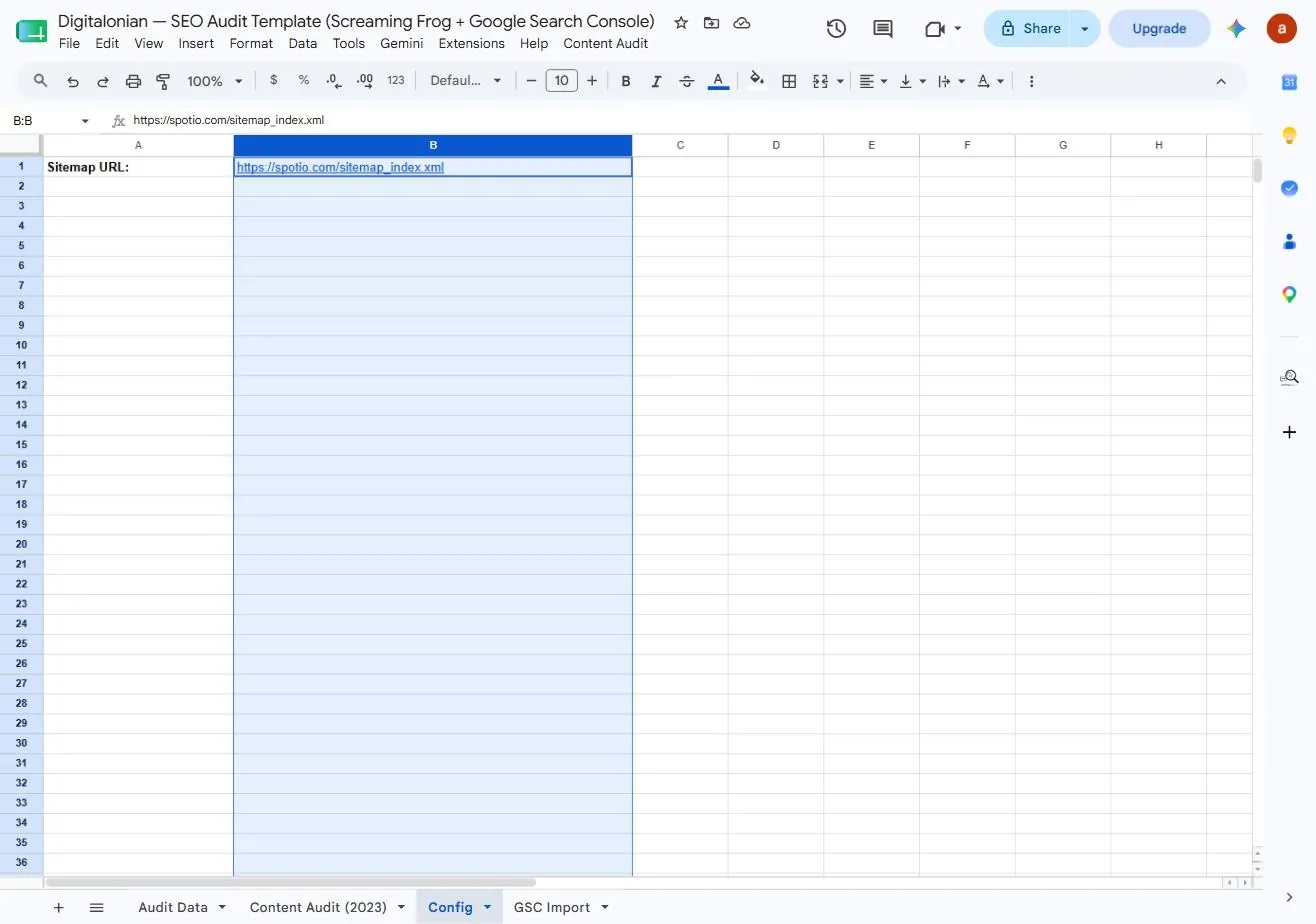
In the Config tab you drop in one thing: the sitemap URL. For this run it’s spotio.com/sitemap_index.xml. The script reads the sitemap itself, so you never hand-build a URL list, it discovers every page for you.
2. The engine: one Apps Script does the plumbing
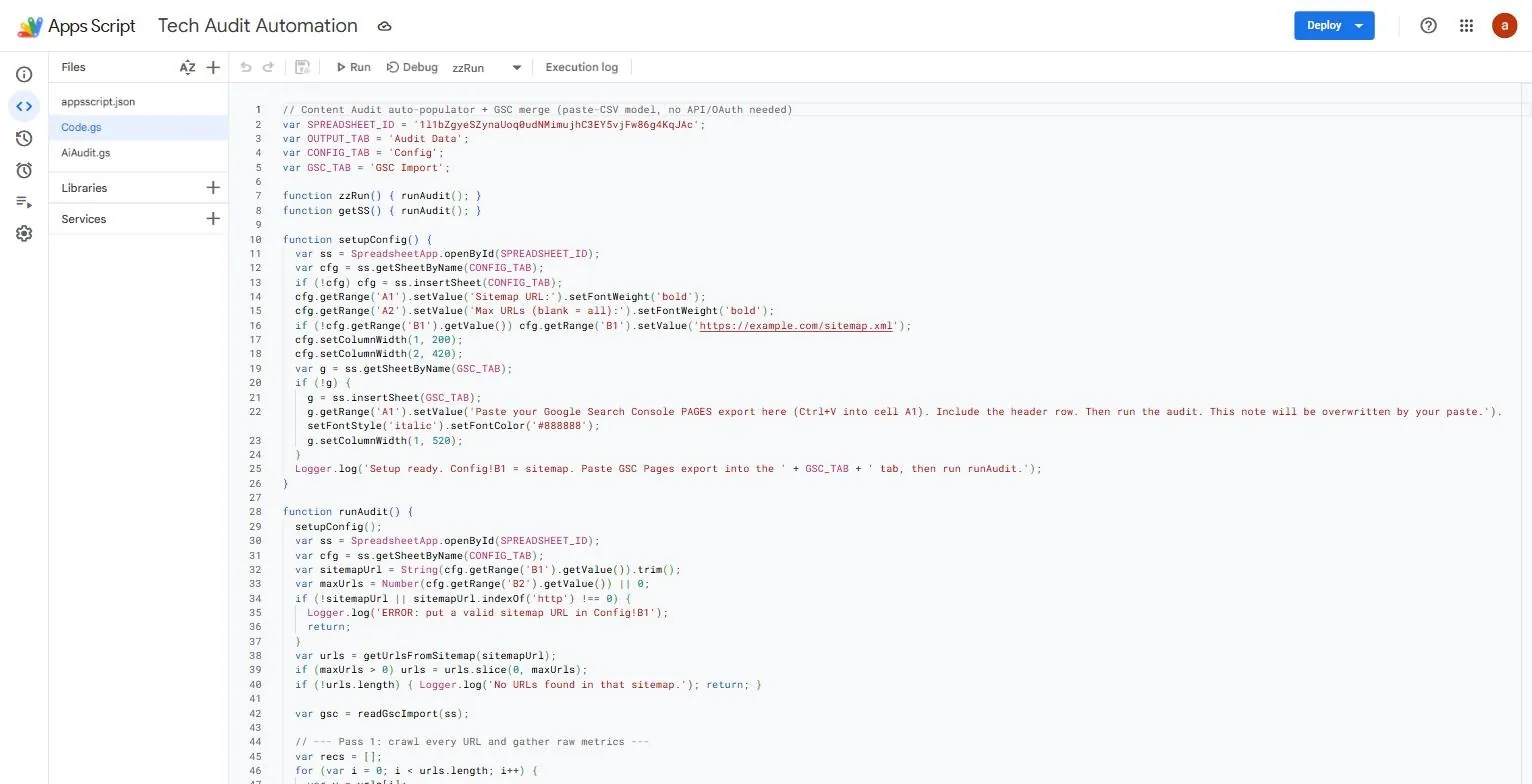
Behind the sheet sits a single Apps Script, “Tech Audit Automation.” It crawls each URL, reads status codes and on-page signals, and merges your Search Console export by URL. The comment at the top of the code says it plainly: paste-CSV mode, no API or OAuth setup needed. That is what keeps this usable by a non-technical owner instead of a dev team.
3. Add one Gemini key and pick a model
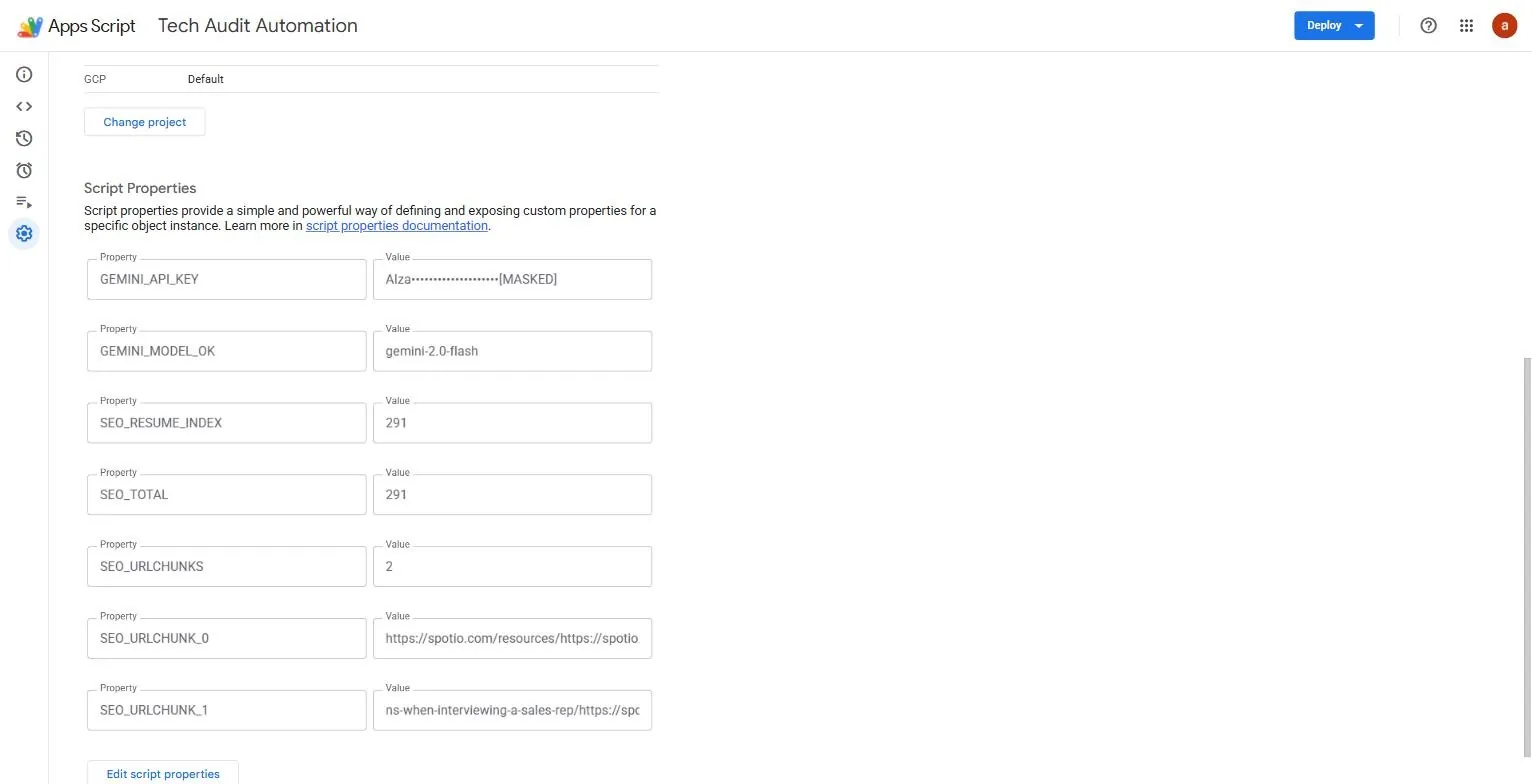
The only credential the tool needs is a Gemini API key, stored safely as a Script Property (masked here, never paste a live key into the sheet body or a screenshot). The model is set to gemini-2.0-flash, which is fast and cheap enough to score hundreds of URLs for a few cents. Gemini writes the plain-English recommendation for each page; the scoring itself is rule-based and completely free.
4. Run the whole thing from one menu
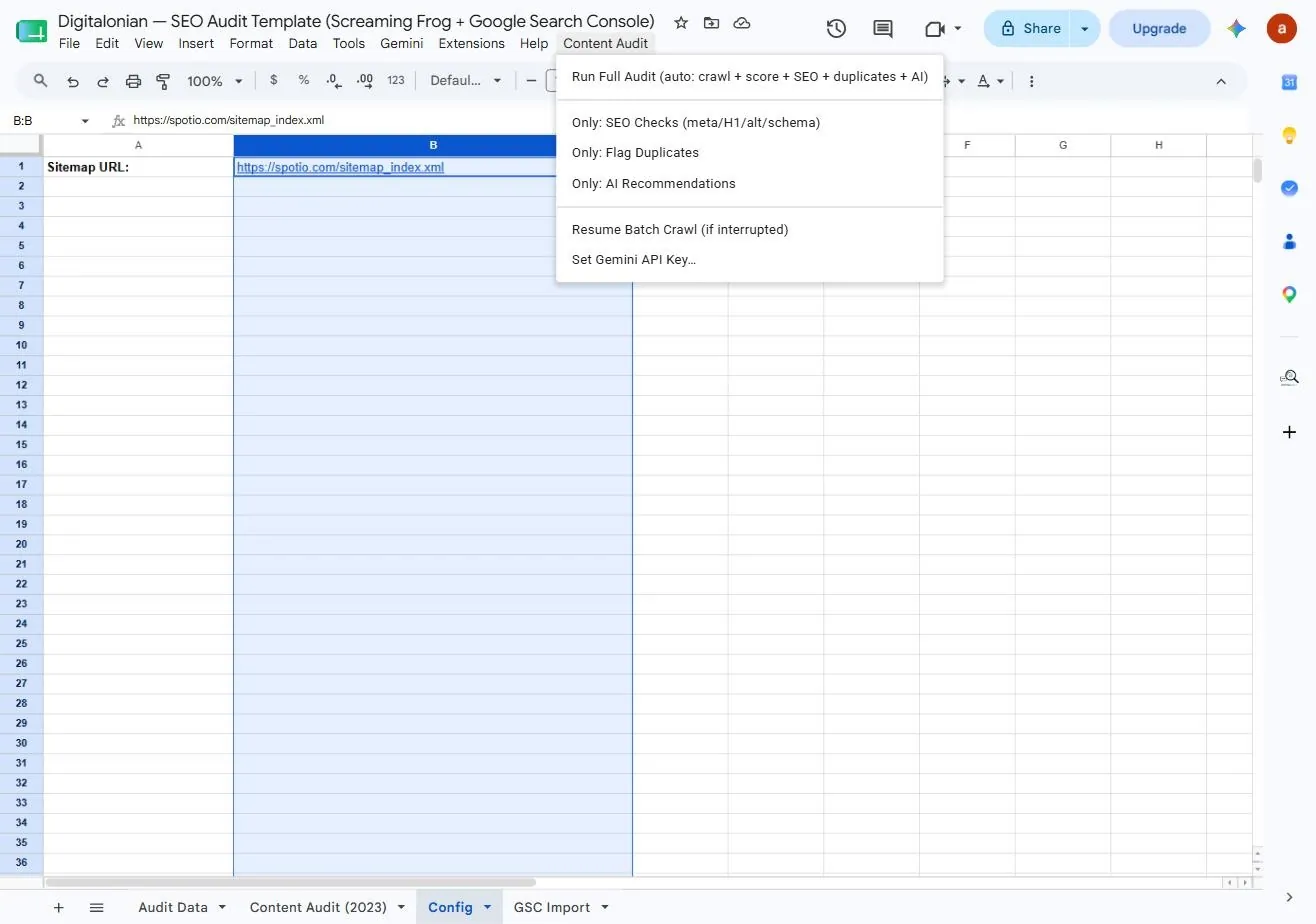
Everything runs from a custom “Content Audit” menu the script adds to your sheet. Run Full Audit does it all in one click, crawl, score, SEO checks, duplicate flags, and AI recommendations. You can also run a single stage, or resume a large batch if it was interrupted. On spotio’s 291 URLs the full run finished in a couple of minutes.
5. What you get back: crawl and Search Console in one sheet
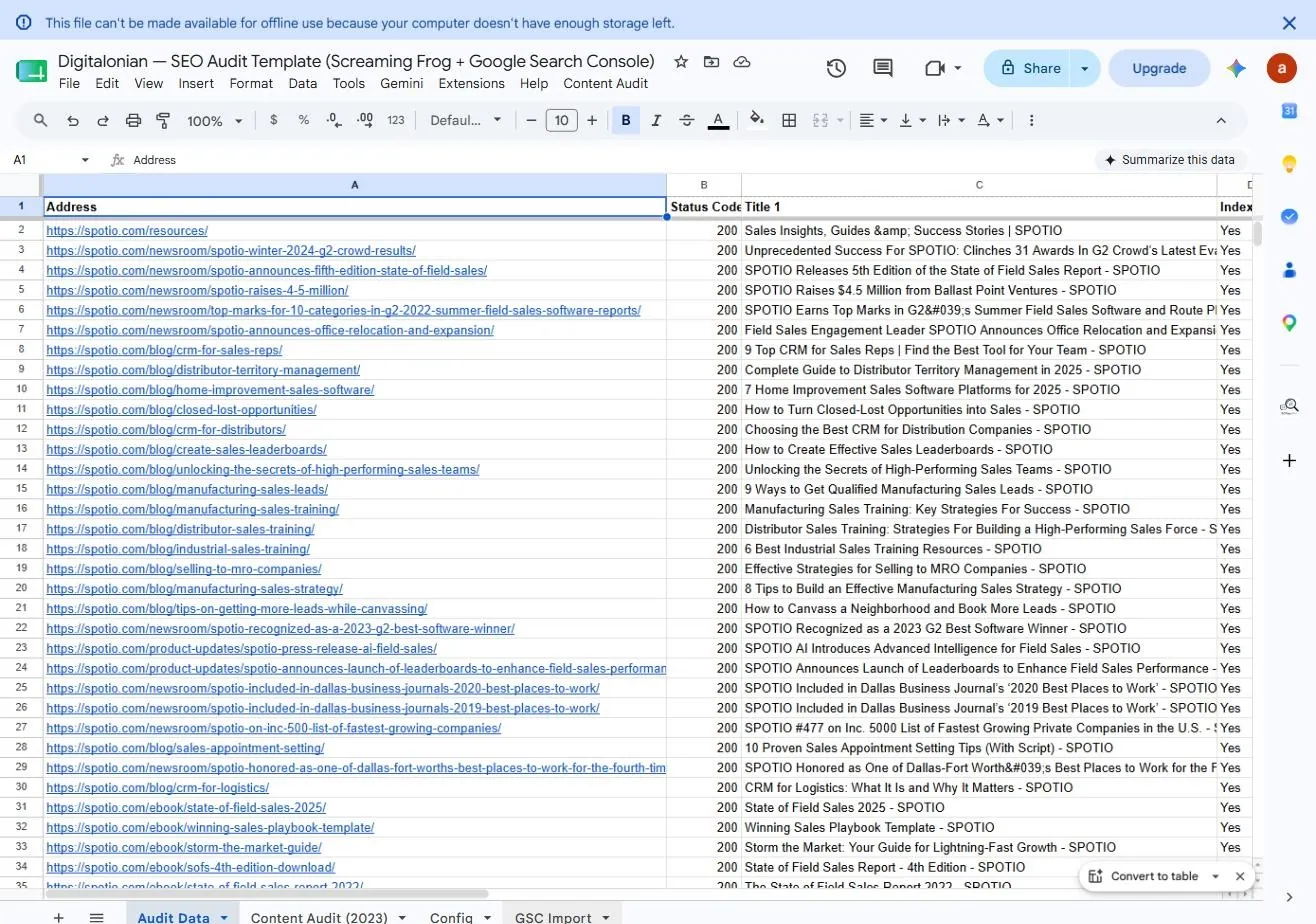
The Audit Data tab is the merged picture: every URL with its status code, title and indexability, and right beside it the clicks, impressions, CTR and average position from Search Console. This single join is the thing that turns a flat list of issues into a list you can prioritise by revenue, not by gut feel.
6. Every URL scored against its own benchmarks
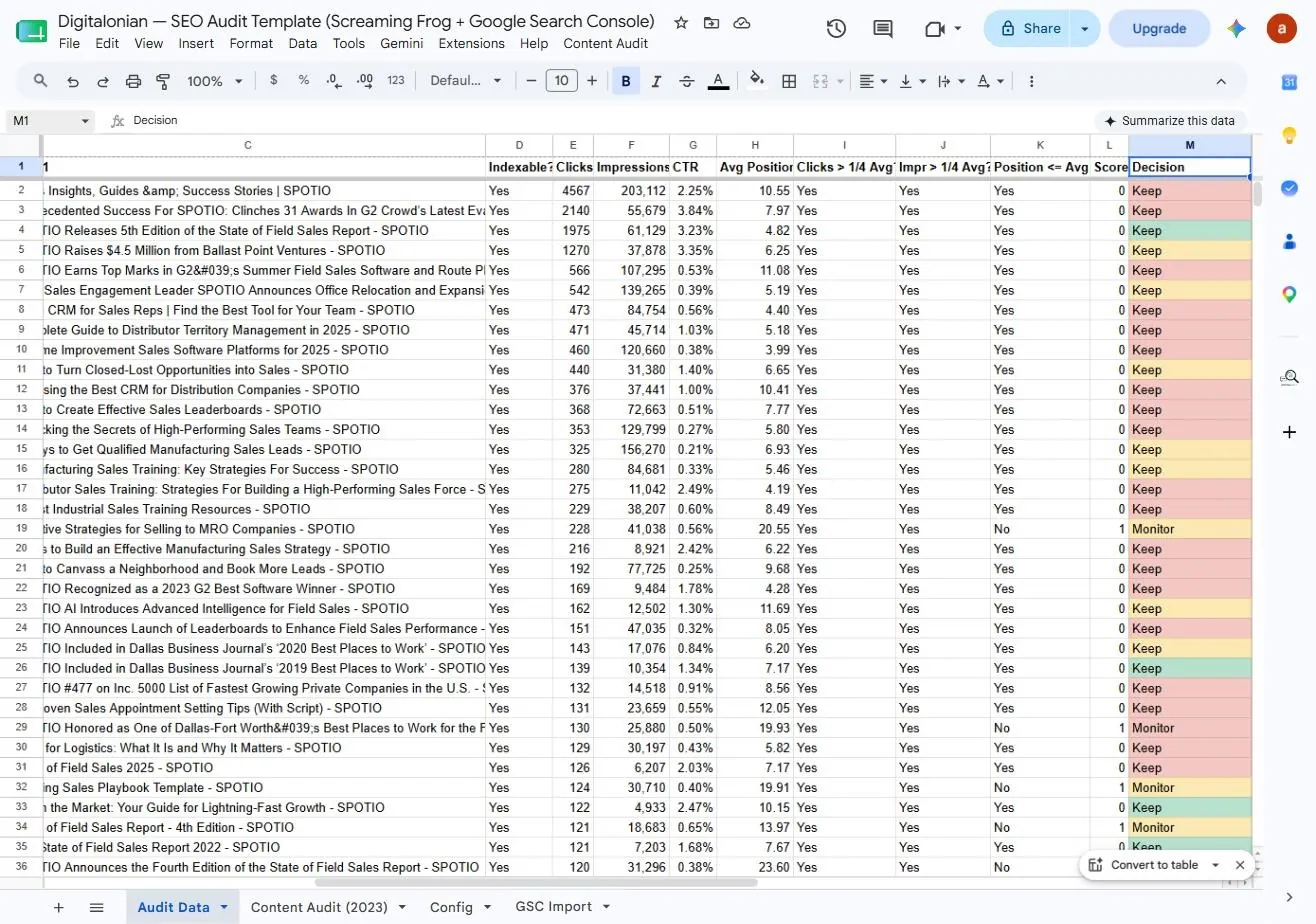
The sheet computes site-wide averages and a “quarter-of-average” threshold, then checks each URL: is it pulling more than a quarter of the average clicks? More than a quarter of average impressions? Is it indexed on Google? Those checks roll up into a Score and a Decision, Keep, Refresh, Consolidate or Kill, colour-coded so the pattern jumps off the screen.
7. The decision, plus the exact on-page fixes
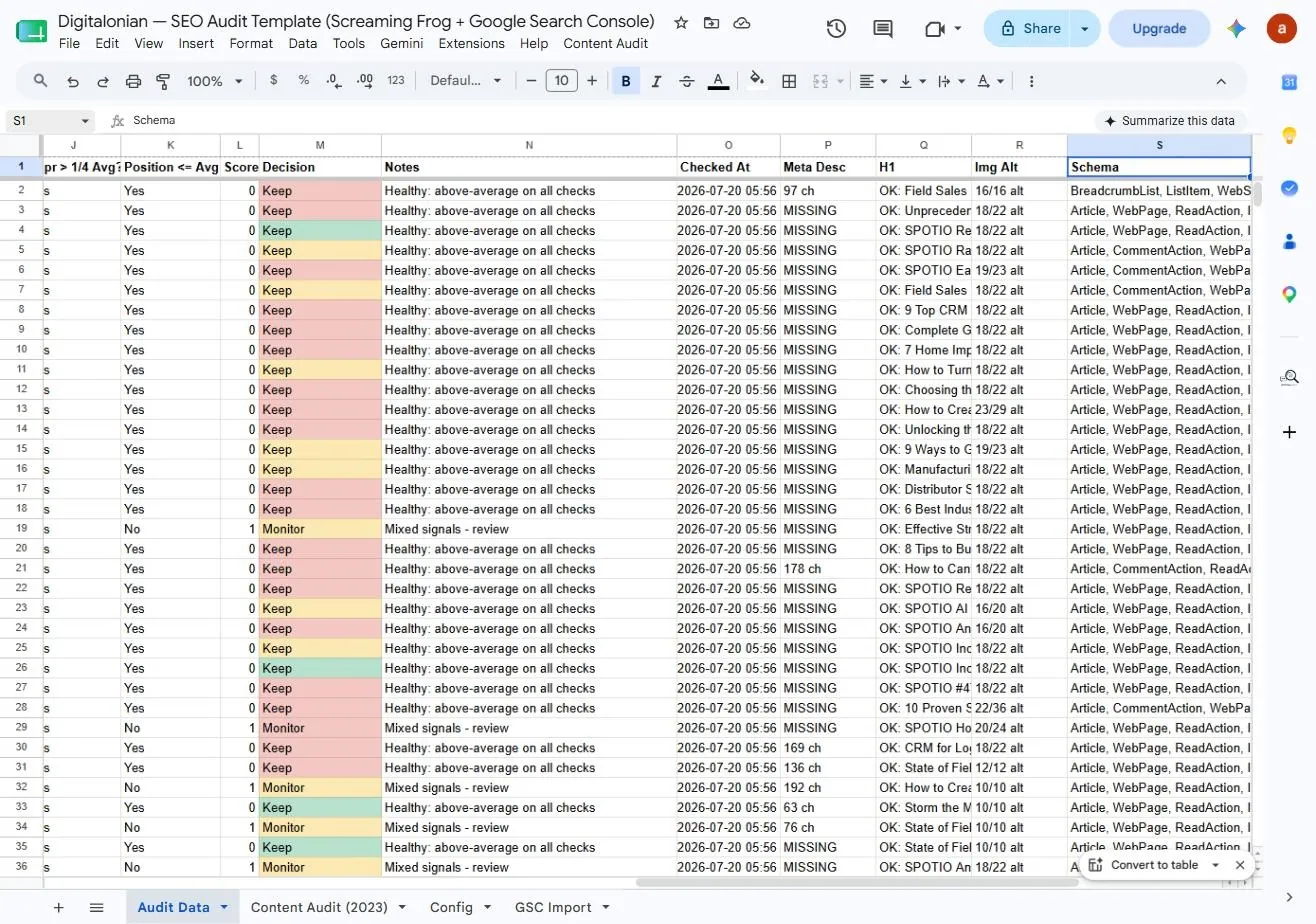
The final view pairs each decision with a short reason and the specific technical flags to act on, missing meta descriptions, H1 status, image-alt coverage, and whether schema is present. For spotio, most high-traffic pages came back “Keep, healthy,” while a cluster of weaker pages flagged “Monitor, mixed signals” with MISSING meta descriptions. That is exactly the short, ranked to-do list a lean team can actually clear.
What this actually gets you
The output isn’t a report, it’s a backlog. In an afternoon you go from “we should audit the site” to a colour-coded, traffic-weighted list of what to keep, fix, merge or cut, with the on-page issues named for each one. Pair that with a human pass (we run ours through a Claude workflow to sanity-check the priorities and draft the fix tickets) and the loop gets genuinely fast. Running it this way, automation for the grunt work, Claude and a human for the judgment, we’ve seen roughly a 30% lift in organic visibility. The gain doesn’t come from the tool spotting cleverer issues; it comes from shipping fixes on a weekly cadence instead of filing one document a year. Your numbers will vary, but the mechanism is the same: less time describing problems, more time closing them.
One honest caveat: on large sites the Gemini step can hit a rate limit (a 429), which simply means a few AI recommendations come back marked “review.” The rule-based score and the on-page flags still populate for every URL, and the Resume option picks up where it left off, so a rate limit slows the AI notes, it never breaks the audit.
Want us to run it for you?
Short on time, or want a second pair of eyes on the priorities? Send your site over and we will run the audit plus a human review, then send back the ranked fix list. Drop your website URL and what you are trying to fix in the message below.
What a technical SEO audit actually means
Strip away the jargon and a technical SEO audit answers one question: which of your pages are helping you, which are hurting you, and what is quietly stopping Google from ranking the good ones. It checks whether pages return the right status codes, whether they are indexed, whether titles and meta descriptions exist, whether headings and image alt text are in place, and how each page actually performs in search. The goal is not to collect problems. It is to decide, page by page, what to keep, what to fix, what to merge, and what to remove. When you automate technical SEO audits with AI, that call gets faster, not different.
What this gets a small business
For a small business the payoff is practical. You stop paying an agency four figures for a PDF nobody reads. You get a ranked list of fixes your website person, or you, can clear in a week. Fixing pages that already earn impressions but sit on page two is usually the fastest way to win back clicks, because the demand is already there. Cleaning up thin or dead pages frees Google to spend its crawl budget on the pages that make you money. In plain terms: more of your existing content starts showing up, the pages that convert get seen, and you spend your time shipping fixes instead of reading reports. That is what it looks like to automate technical SEO audits with AI on a real budget.
When we ran this loop on our own site, the results matched what a good technical audit is supposed to produce. Pages got recrawled and reindexed faster. A batch of page-two posts moved up once their meta descriptions and headings were fixed. The dead weight came off the crawl. Together that worked out to the roughly 30% lift in organic visibility I mentioned above. I want to be honest about the reason: the tool did not find cleverer problems than a human would. It made the boring part fast enough that we actually shipped the fixes, week after week, instead of filing them and moving on.
Why not just run it in ChatGPT or Claude?
You could paste your data into ChatGPT or Claude and ask for the same analysis. People do. The problem shows up at scale. A real site has hundreds of URLs, so you end up chunking the data to fit the context window, babysitting the chat, and paying for every token on every re-run. Do it by hand once and it is a long afternoon. Do it every month and it becomes the chore you quietly stop doing. This sheet handles the crawl and the Search Console merge for free, then spends one cheap gemini-2.0-flash call per page only on the part that needs judgment, the written recommendation. You do not need to code, and you do not need to be good at prompting, because the prompt is already built in. Re-running next month costs a couple of minutes and a few cents. If you want to point the same AI-plus-human approach at your rivals, we walk through it in our guide to ChatGPT for SEO competitor analysis.
The exact prompt, if you would rather run it yourself
Prefer not to touch the automated sheet? You can run the same audit by hand in any AI assistant. Paste your merged crawl and Search Console sheet into it, then give it this:
You are a technical SEO analyst. Here is a crawl merged with Search Console data. 1) Group every issue into no more than five themes. 2) For each URL, label it keep, refresh, consolidate, or kill based on its traffic and technical state. 3) Rank the themes by likely revenue impact and explain each ranking in one line. 4) Draft one task ticket for the top theme.
You can also skip the prompt entirely. The five steps above are the method in full: crawl your site and keep only the signal, merge in Search Console so impact is visible, cluster the issues into five themes and label each URL keep, refresh, consolidate, or kill, put a human on the priorities, then ship the top themes as tickets and re-run on a cadence. The sheet automates all of it, the prompt does it in a single paste, and the steps let you run it by hand. Same logic, three levels of effort, so pick the one that fits your time and budget.
Try It in 30 Minutes
Get the Free SEO Audit Template →
You do not need a budget or a developer to test the idea. Export your latest crawl, keep only URL, issue type, and status code, and paste a sample into your AI assistant. Ask it to group the issues into no more than five themes, rank those themes by likely revenue impact, and draft a single task ticket for the top one. In half an hour you will have a prioritized mini-backlog that would have taken a full afternoon by hand, and you will still be the one deciding whether the machine got the priorities right.
Frequently Asked Questions
Does AI replace a technical SEO? No. It replaces the tedious data-gathering, not the decisions. The strongest results come from a workflow that blends automation with human expertise, where the machine finds and clusters issues and a human decides what to fix and when.
Is a one-time audit ever worth it? For a quick health check, yes. But for real long-term growth, an ongoing, mission-based cycle beats a static document, because technical SEO keeps shifting as you fix it.
What tools do I need to start? A crawler, access to Search Console, a project management tool your team already uses, and any capable AI assistant. The workflow matters far more than the specific brand of any one tool.
Will this work for a small site? Especially for a small site. Fewer URLs means the AI clustering is sharper and the human review takes minutes, so a lean team gets agency-grade prioritization without the agency invoice.
The Takeaway
The point of automating a technical SEO audit is not to produce a longer document faster. It is to spend less time documenting and more time shipping fixes that actually move rankings. Let AI handle the crawling, clustering, and scoring, keep the prioritization human, and run the work as missions inside the tools your team already lives in. That is how a small team gets the results of a big agency without the overhead.
Want the condensed playbook plus the exact prompt and scoring template we use? We break it down, step by step, in the Digitalonian newsletter.